
Table of Contents
- What Are Custom DTF Transfers?
- Why No Minimum Orders Change the Math for Small Batches
- DTF Gang Sheet Builder: How to Set Up Your Layout
- How to Press DTF Transfers: Step-by-Step Application
- DTF Transfer Wash Test Results: What 50+ Washes Actually Means
- Pricing, Turnaround Time, and Shipping
- Custom DTF Transfers for Every Use Case
- Conclusion
Last Updated: August 30, 2026
What Are Custom DTF Transfers?
Custom DTF transfers, Direct to Film transfers, are full-color heat transfers printed onto specialized transfer film using CMYK inks plus a white ink underbase. After printing, adhesive powder is applied and cured, creating a ready-to-press transfer that bonds to almost any fabric when heat is applied. No screens, no weeding, no setup fees per color.
The white ink layer separates DTF from older heat transfer methods, enabling full-color, photorealistic prints on dark garments without visible carrier background. DTF adheres to polyester, cotton, blends, nylon, and denim. At Rapid Fire DTF, we've built our operation around this technology because it delivers vibrant colors and 50+ wash durability without the overhead of traditional screen printing.
Why No Minimum Orders Change the Math for Small Batches
Screen printing typically requires 24, 48, or 72 pieces per design to justify setup costs. No minimum orders flip the model entirely: you order exactly what you need and pay only for what you press. There are no setup fees, no leftover inventory, and no upfront commitment to untested designs.
For apparel brand founders doing test runs, this is the difference between launching and waiting. For small business owners ordering branded staff uniforms, it means ordering precisely the right count without overpaying.
The trade-off: per-unit cost on a single transfer is higher than per-unit cost on a bulk run. But when you factor in zero waste, zero storage, and zero risk on untested designs, the no-minimum model is frequently cheaper in total cost for runs under 50 pieces.
Gang Sheets vs. Single Prints: Cost-Benefit Breakdown
A gang sheet is a single sheet of transfer film holding multiple designs or copies, packed tightly to minimize wasted film. Instead of ordering individual transfers one at a time, you fill a sheet with everything you need and pay for sheet area rather than per-design.

A sheet packed with 12 small logos costs meaningfully less per logo than ordering those 12 individually. Single prints make sense when testing a new design or needing one custom piece quickly. Gang sheets make sense when you have multiple designs or sizes to press in the same session.
| Scenario | Best Option | Why |
|---|---|---|
| Testing a new design | Single print | Low risk, no wasted transfers |
| Multiple designs, same order | Gang sheet | Lower cost per transfer |
| Repeat orders for one design | Gang sheet | Fill sheet with duplicates |
| One-off custom gift | Single print | No minimum required |
| Small batch uniforms (10-20 pcs) | Gang sheet | Efficient use of film area |
The break-even point where gang sheets clearly win is roughly when you have enough designs or copies to fill at least 70-80% of the sheet.
DTF Gang Sheet Builder: How to Set Up Your Layout
A DTF gang sheet builder is an online tool that lets you arrange multiple designs on a single sheet of transfer film before submitting your print order. Rapid Fire DTF offers two rolling gang sheet options: a 22-inch wide sheet starting at $12.34 and a 25-inch wide sheet starting at $14.00. You choose the width, then specify the length based on how many designs you're fitting.
Setting up your layout effectively requires:
- Group designs by press temperature. Keep designs requiring different heat settings on separate sheets.
- Nest designs tightly. Leave about 0.25 inches between designs to minimize wasted space.
- Mix sizes strategically. Fill gaps left by large designs with smaller logos or text transfers.
- Duplicate your best-sellers. Fill remaining space with extra copies rather than leaving it blank.
File Requirements and Artwork Guidelines
Getting your files right before uploading prevents wasted transfers and reprints.
File format: PNG with a transparent background is standard. Transparent backgrounds let the white ink layer print correctly without a visible box around your design.
Resolution: Minimum 300 DPI at print size. Sending a 72 DPI raster image and scaling it up produces blurry output. If your artwork is a vector file, export it at 300 DPI or higher at intended print dimensions.
Color mode: RGB color mode is preferred for DTF printing, not CMYK. The printer's RIP software handles the CMYK conversion.
What to avoid: Very thin lines under 1pt, small text under 0.25 inches tall, and gradients that fade to transparent.
According to the Specialty Graphic Imaging Association's file preparation guidelines, proper file preparation is one of the most common sources of print quality issues in garment decoration.
How to Press DTF Transfers: Step-by-Step Application
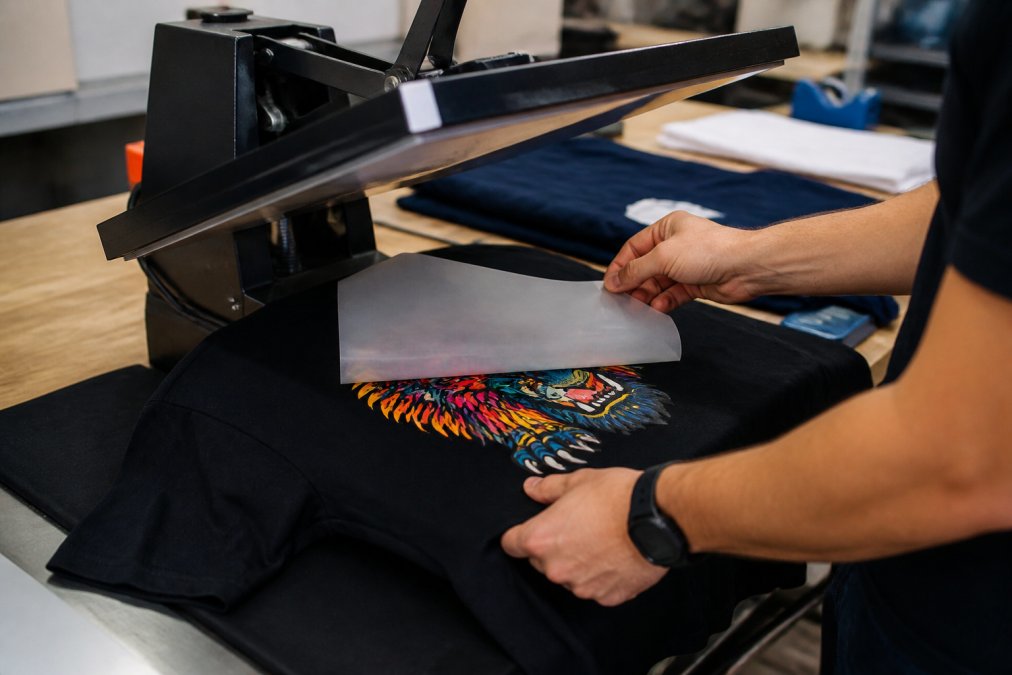
Applying a DTF transfer correctly takes about 90 seconds per piece once your heat press is calibrated.
- Pre-press the garment for 3-5 seconds to remove moisture and wrinkles.
- Position the transfer adhesive-side down on the garment using a heat-resistant ruler for alignment.
- Apply heat and pressure according to fabric-specific settings (see below).
- Peel the carrier film. Most DTF transfers are hot peel; remove the film immediately while warm. Cold peel transfers require cooling to room temperature first.
- Re-press for 5-10 seconds with a Teflon sheet or parchment paper on top to improve adhesion and wash durability.
Fabric-Specific Heat Press Settings
Fabric-specific settings matter significantly. "Press at 300°F for 15 seconds" is not useful when pressing onto a polyester athletic jersey versus a heavyweight cotton hoodie. Always do a test press on a scrap piece of the same fabric before running a full batch.
| Fabric Type | Temperature | Dwell Time | Pressure | Peel Type |
|---|---|---|---|---|
| 100% Cotton | 300-320°F | 15 seconds | Medium-firm | Hot peel |
| 100% Polyester | 270-290°F | 12-15 seconds | Medium | Hot peel |
| 50/50 Cotton-Poly Blend | 290-305°F | 15 seconds | Medium | Hot peel |
| Nylon | 250-270°F | 10-12 seconds | Light-medium | Cold peel |
| Denim | 305-320°F | 15-18 seconds | Firm | Hot peel |
| Performance/Moisture-Wicking | 260-280°F | 10-12 seconds | Light | Cold peel |
Critical notes by fabric:
- Polyester: High heat causes scorching and dye migration. Stay below 300°F.
- Nylon: The most heat-sensitive substrate. Use cold peel and check for scorching after the first test press.
- Cotton: The most forgiving. Higher pressure and longer dwell time improve adhesion without risk of damage.
As documented in ASTM International's textile testing standards, heat application variables including temperature, pressure, and dwell time are the primary determinants of transfer bond strength on textile substrates.
Troubleshooting Common Application Failures
Most DTF application failures trace back to one of four causes.
Problem: Transfer peeling at edges after washing Cause: Insufficient pressure or dwell time. The adhesive layer didn't fully bond at the edges. Fix: Increase pressure and add 2-3 seconds to dwell time. Re-press with a Teflon sheet immediately after the initial press.
Problem: Transfer not adhering at all Cause: Moisture in the garment, or press temperature too low. Fix: Pre-press for 5 seconds to drive out moisture. Verify your press temperature with an infrared thermometer; platens often read 15-20°F lower than the display shows.
Problem: Cracking after a few washes Cause: The re-press step was skipped, or the transfer was cold-peeled when it should have been hot-peeled. Fix: Always re-press. Check whether your transfers are hot peel or cold peel and follow the correct method.
Problem: Color looks washed out or dull Cause: Too much pressure flattening the ink layer, or pressing on a foam-padded platen that doesn't distribute heat evenly. Fix: Reduce pressure slightly. Use a firm, flat pressing surface rather than a sponge pad.
DTF Transfer Wash Test Results: What 50+ Washes Actually Means
DTF transfers hold up through 50+ washes because the adhesive powder bonds to fabric fibers during curing. The adhesive layer fuses into the fiber structure at the microscopic level rather than sitting on top of the fabric like a plastisol screen print, making it resistant to the mechanical stress of washing and drying.
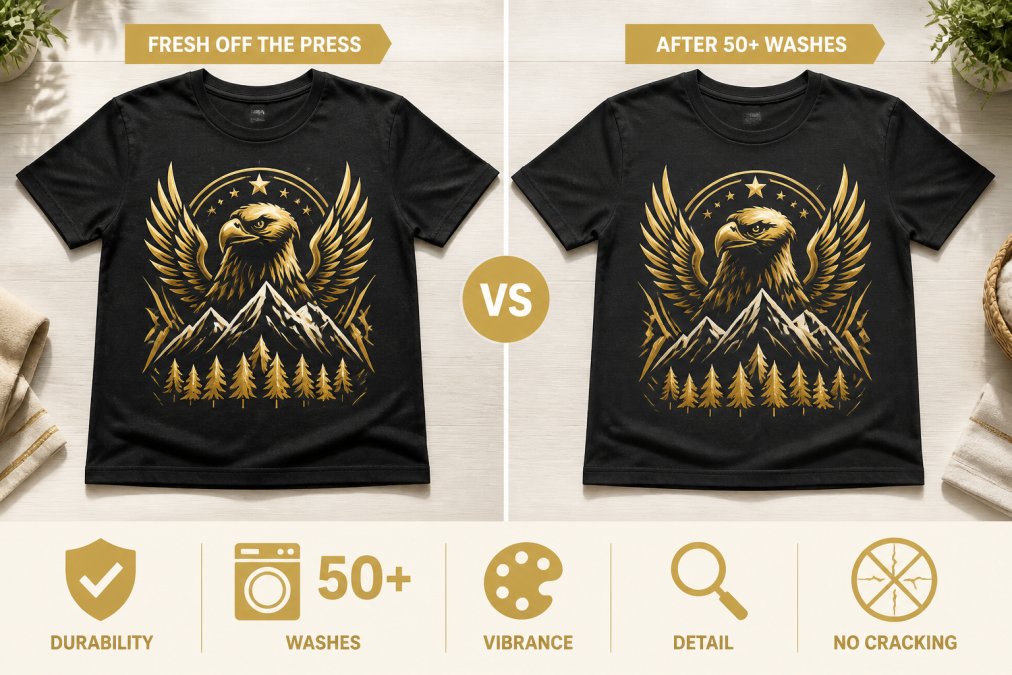
The practical meaning of 50+ washes: a garment washed twice a week reaches 50 washes in about six months. A sports uniform washed after every game reaches 50 washes in roughly one season. For branded staff uniforms worn daily, 50 washes represents several months of regular use.
Wash conditions matter. Turning garments inside out, washing in cold water, and avoiding high-heat dryer cycles all extend transfer life. High-heat drying is the single biggest accelerator of transfer degradation.
According to the American Association of Textile Chemists and Colorists' colorfastness testing standards, standardized wash testing uses specific temperature, agitation, and cycle parameters to simulate real-world wear.
Pricing, Turnaround Time, and Shipping
Rapid Fire DTF's rolling gang sheets start at $12.34 for the 22-inch wide option and $14.00 for the 25-inch wide option. Pricing scales with sheet length; the more designs you add, the longer the sheet and the higher the total. There are no setup fees and no per-color charges.
The first-order discount is 50% off, making testing the print quality essentially risk-free. Free shipping applies to orders over $199. Below that threshold, standard shipping rates apply.
For turnaround time, account for both production and transit. Ordering with a week or more of buffer is the safer approach for time-sensitive projects. The no-minimum structure means you can place smaller, more frequent orders rather than one large order with a long lead time.
Custom DTF Transfers for Every Use Case
Custom DTF transfers work across many applications, and the no-minimum model makes them practical for use cases that would be cost-prohibitive with traditional printing.
Etsy sellers and on-demand creators: Order transfers as orders come in. No inventory, no waste, no minimum. Per-transfer cost is predictable, making product pricing straightforward.
Sports teams and event organizers: Uniform runs of 15-30 pieces are ideal for DTF gang sheets. Pack all player names and numbers on a single sheet, press them onto jerseys, and you're done. Turnaround is faster than screen printing for small runs.
Apparel brand founders: Test colorways, new designs, or seasonal graphics without committing to a full production run. DTF transfers let you validate demand before scaling to larger quantities.
Small business owners: Branded staff uniforms in exact headcount quantities. No overage, no shortfall. Add new hires with a single small order.
Screen printing shops: DTF fills the gap for jobs that don't hit your screen printing minimums. Offer small orders as DTF transfers with no setup fees instead of turning them away.
The common thread across all use cases is flexibility. DTF gang sheets, built to your exact size requirements, let you serve customers and fulfill orders without the constraints that make traditional printing impractical for small batches.
As noted in the Printing Industries of America's garment decoration market overview, on-demand and short-run printing has grown substantially as brands and creators shift away from inventory-based models toward fulfillment on demand.
Frequently Asked Questions
What are custom DTF transfers?
Custom DTF (Direct to Film) transfers are full-color heat transfer prints produced on a special film using CMYK inks plus a white ink base layer and adhesive powder. You apply them to garments or other substrates with a heat press. Because there's no weeding and no screen setup, they work for any design complexity, including gradients and photographic images, making them a go-to for on-demand and small-batch garment decoration.
Are there any minimum order requirements for DTF transfers?
No. Rapid Fire DTF has no minimum order quantities. You can order a single custom gang sheet starting at $12.34 for the 22-inch wide option or $14.00 for the 25-inch wide option. This makes the service practical for Etsy sellers, sports teams, and small business owners who need a handful of prints rather than a bulk run. There are no setup fees added to small orders.
How many washes do high-quality DTF transfers last?
Rapid Fire DTF transfers are tested to 50+ washes without cracking, peeling, or significant color fade when applied correctly at the right temperature, pressure, and dwell time. Wash durability depends on following the application instructions, including proper curing, and on using a cold or warm wash cycle rather than high heat. Turning garments inside out before washing also extends print life.
Can I use a regular heat press for DTF transfers?
Yes, a standard clamshell or swing-away heat press works for DTF transfer application. You do not need a specialty machine. The key variables are consistent temperature, even pressure, and correct dwell time, all of which vary slightly by fabric type. Cotton typically presses at around 300-320°F for 10-15 seconds. Always follow the specific settings provided with your transfers to avoid under-curing or scorching the garment.
Small-batch custom apparel has always involved an uncomfortable compromise: pay for minimums you don't need, or skip the order entirely. Rapid Fire DTF eliminates that compromise with no minimum orders, 50+ wash durability, and a gang sheet builder that makes efficient layouts accessible without technical expertise. The 50% first-order discount makes it straightforward to test print quality before committing to regular orders. Build your rolling gang sheet and get your first order at half price.
This article was written using GrandRanker